
How to Install Crafty Links Pro
(Step‑by‑Step – No Technical Skills Required)
Crafty Links Pro requires the free Crafty Links plugin to work.
Please follow the steps below in order.
What You’ll Need Before You Start
- A WordPress website
- WordPress admin access
- Your Crafty Links Pro license key
- The Crafty Links Pro ZIP file
STEP 1 — Install the Free Crafty Links Plugin (Required)
Crafty Links Pro will not work without the free plugin.
- In WordPress Admin, go to Plugins → Add New
- Click the Upload Plugin button at the top

- Click Choose File
- Select your file:
supplies-links-table.zip - Click Install Now

- Click Activate Plugin
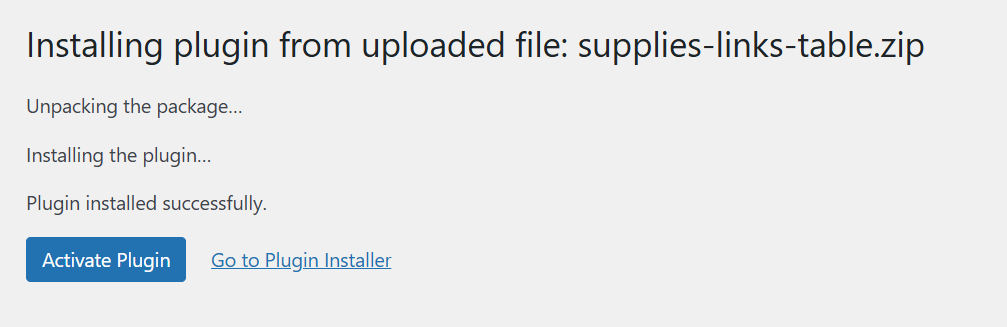
The free plugin is now installed.
Why this is required:
Crafty Links Pro extends the free plugin and adds advanced features. It does not work on its own.
STEP 2 — Install Crafty Links Pro
- In WordPress Admin, go to Plugins → Add New
- Click the Upload Plugin button at the top
- Click Choose File
- Select your file:
crafty-links-pro.zip - Click Install Now
- Click Activate Plugin
Crafty Links Pro is now installed.
STEP 3 — Activate Your License Key
- In WordPress Admin, go to:
Crafty Links Pro → Settings
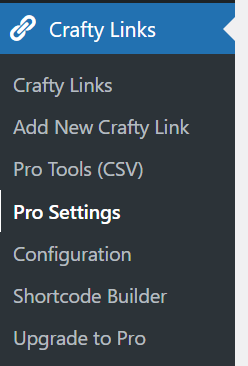
- Find the License Key field
- Paste your license key (example format):
ABCD-1234-EFGH-5678 - Click Activate License
Once activated, all Pro features become available.
How to Check That Everything Is Working
Go to Plugins → Installed Plugins and confirm:
- Crafty Links — Active (Free)
- Crafty Links Pro — Active
If both are active, your setup is complete
Common Questions
Do I really need the free plugin?
Yes. Crafty Links Pro depends on the free version and will not run without it.
Can I delete the free plugin after installing Pro?
No. Keep both plugins active.
Can I use the same license on multiple sites?
Yes — the number of sites depends on the license you purchased.
You can see:
- Sites used / allowed
- Expiration date
in My Account → Licenses.
Troubleshooting
“Plugin could not be activated”
- Make sure the free Crafty Links plugin is active
- Make sure you uploaded the Pro ZIP file, not a folder
“License key is invalid”
- Copy & paste the key again (no spaces)
- Make sure the site URL matches what you are activating
You’re All Set!
You can now start using Crafty Links Pro
If you need help, contact support or check your My Account → Licenses area.